How to Fix a Reused Content Flag on YouTube
A reused content flag is a channel-level problem. Here's the audit-and-triage workflow: confirm the notice, check every video, fix or remove each one, then ask for review.
In this article
You fix a reused content flag by auditing every video on the channel, then editing, replacing or removing each one that lacks original value: real commentary, analysis or substantial original material. After that, you request a review or reapply to the YouTube Partner Program (YPP) once the program rules allow it. Nobody can promise approval, because YouTube's reviewers make that call.
The key point is scope. Reviewers judge the channel as a whole, so fixing one video won't clear a channel-level flag.
What a reused content flag means for your channel
A reused content flag means YouTube reviewed your channel and decided a large share of it isn't clearly your own original creation, so monetization was declined or removed. It's a channel decision, not a verdict on one upload.
Reused content usually looks like other people's clips, compilations, re-uploads or slideshows with little added. Filters, crops, speed changes and background music don't change that. YouTube has also been grouping this under its inauthentic content policy wording, so read the exact text in your notice and in the YouTube Partner Program policies. Rules change, and the current page wins over any blog post, this one included.
One distinction saves confusion. A Content ID claim is about copyright matching on a single video. A reused content flag is a monetization-eligibility judgment about the channel. You can have one without the other.
Step 1: Confirm the flag and find every affected video
Confirm the flag first, then build a complete list of videos, because you can't fix what you haven't counted.
Where to check the notice in YouTube Studio
Open YouTube Studio and go to the Earn section, where the YPP status and any reason for the decision appear. Check the email attached to the channel too. Copy the notice wording into a doc and note any date it gives for when you can apply again. You'll need both later.
Audit the whole channel, not a sample
The flag is channel-level, so the audit covers every public video, YouTube Shorts included. Shorts are where most flagged channels have the most problems, because clip-and-post is so easy at volume.
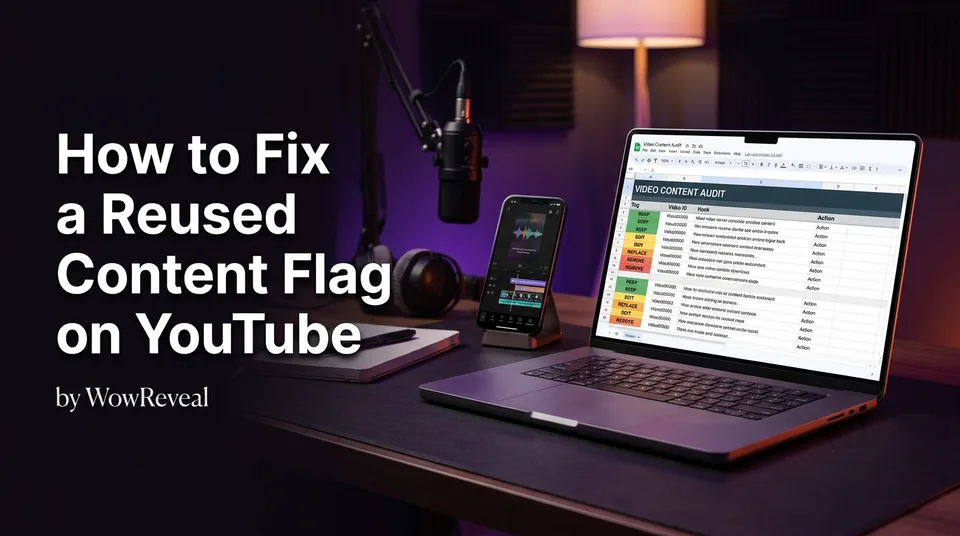
Build a simple tracking sheet from the Content tab. One row per video:
- URL and format (long-form or Short)
- Source of the footage (yours, licensed, someone else's)
- What you added (commentary, analysis, new footage, nothing)
- Decision (keep, edit, replace, remove)
- Date fixed
It's boring work. We've watched creators skip it and spend months re-flagged.
Step 2: Decide for each video: keep, edit, replace or remove
Every video gets one of four decisions, based on how much original value it carries. Be strict with yourself, because a reviewer will be.
| Situation | Decision |
|---|---|
| Your own footage, your own narration | Keep |
| Mostly original, with a few reused stretches | Edit: trim or cut the reused parts in Studio |
| Third-party clip with little added, but you can add real commentary | Replace: upload a new version, then remove the old one |
| Footage you can't legally or meaningfully transform | Remove or set to private |
Removing is a valid choice for videos that can't be fixed. But don't mass-delete before the audit is done. You lose your evidence of what changed, and deleting everything may leave a channel with nothing to review. Replace wherever a better original version is possible.
What to add so a video counts as original
A video counts as original when it adds commentary, analysis or substantial original material that clearly transforms the source. It's not enough to be edited. It has to say something the source doesn't.
What doesn't count: filters, mirroring, cropping, speed changes, music, or a caption that says "wow." What does count: your own opinion, explanation, critique, a breakdown of why something works, or footage you shot yourself.
On the "7 second rule": YouTube doesn't publish any number of seconds that makes a reused clip safe. Treat it as a myth. Fair use is a legal defense, not a YouTube permission, and it's decided case by case, so don't build a channel on it. For legal reuse, get permission or a licence, then add your own value anyway.
Examples for clips, story videos and Shorts
Take a clip channel that posts 30-second sports moments with a trending song. Before: raw clip, no voice. After: the same moment, plus a 20-second voiceover explaining the play, why it mattered and what the player did differently. That's analysis, and the reused footage becomes supporting material.
Story videos work the same way. A narrated story with your own script and structure counts, while a re-upload with a robot reading the title doesn't. Generic text-to-speech isn't originality; the script behind it is.
For Shorts, cut to the single moment, then add your point of view in the first 3 seconds. Tools can speed this up. WowReveal's AI Clipper finds the best moments and its AI voiceover reads your story, but you still supply the angle. Without an angle, you've just made faster reused content.
Step 3: Request a review or reapply
Request a review or reapply only after the whole channel is fixed, and only when YouTube's rules allow it. Check your Studio notice and the Help Center for the current waiting period instead of trusting a number from a forum post.
Before you submit, run a pre-review check: every row in your sheet is resolved, the remaining videos pass a stranger test (could someone tell what you contributed in 10 seconds?), and new uploads follow the same standard.
If there's a place to add context, keep it factual:
I audited all videos on my channel, including Shorts. I removed or replaced [number] videos that lacked original commentary or analysis, and added original voiceover and analysis to [number] others. New uploads follow the same standard.
No pleading, no promises. Approval isn't guaranteed, and a rejection means going back to the sheet, not resubmitting the same channel.
The mistake that keeps channels flagged
The most common mistake is editing a few videos and leaving the rest. Creators fix their 5 best performers, resubmit, and get flagged again because 200 reused uploads are still public.
The reverse error is panic-deleting everything. That erases the evidence and the good work too. Audit first, then triage. Fixing an entire channel takes longer than a weekend for most people, and that's normal.
Prevent the flag from coming back
Prevention is a 30-second check before each upload: what did I add, could a viewer tell, and would this survive in a channel full of similar videos? If the answer to the first question is "nothing," don't post.
Keep the tracking sheet running as a log for new uploads. It doubles as a self-audit and as evidence if you ever need to appeal. And re-read the YPP policies every few months, since the 2026 wording may differ from what you remember.
Frequently asked questions
How do I remove a reused content flag from my channel?
You can't remove it with a single action. Audit every video, edit, replace or remove those lacking original value, then request a review or reapply when YouTube's rules allow. YouTube decides the outcome.
Should I delete all my videos to fix reused content?
No. Audit first and decide per video. Remove or set private only those that can't be fixed, and replace others with original versions where possible.
Does adding music or a filter make reused content original?
No. Filters, crops, speed changes and music don't transform the source. Commentary, analysis or substantial original material does.
Where to go next
- What Is Reused Content on YouTube? Meaning, Examples and What Counts as Original — confirm what counts as reused before you start the audit.
- Reused Content Checker: How to Self-Audit a Video Before Posting — a per-video method for the audit in step 1.
- How to Add Commentary to Reused Video for Facebook Reels — how to add real commentary to reused footage, which applies to YouTube too.
- Why Shorts Get Demonetized and How to Appeal — the appeal and review path after the fixes are done.
- Monetization-Safe Shorts: A Pre-Publish Checklist for Every Reel and Short — a prevention checklist to run before each upload.
Generate your reel right now
Paste a link to any video — WowReveal writes the story, voices it and adds captions, a headline and music. Ready for Reels, Shorts and TikTok.



No link? Upload a file
- 30 free credits
- No card needed
- Voiceover in 9 languages
- Failed jobs refunded