YouTube Shorts Size and Aspect Ratio: 1080x1920 Explained
The right YouTube Shorts size is 1080x1920 pixels at 9:16. Here's what YouTube accepts, where captions are safe, and the black bars mistake to avoid.
In this article
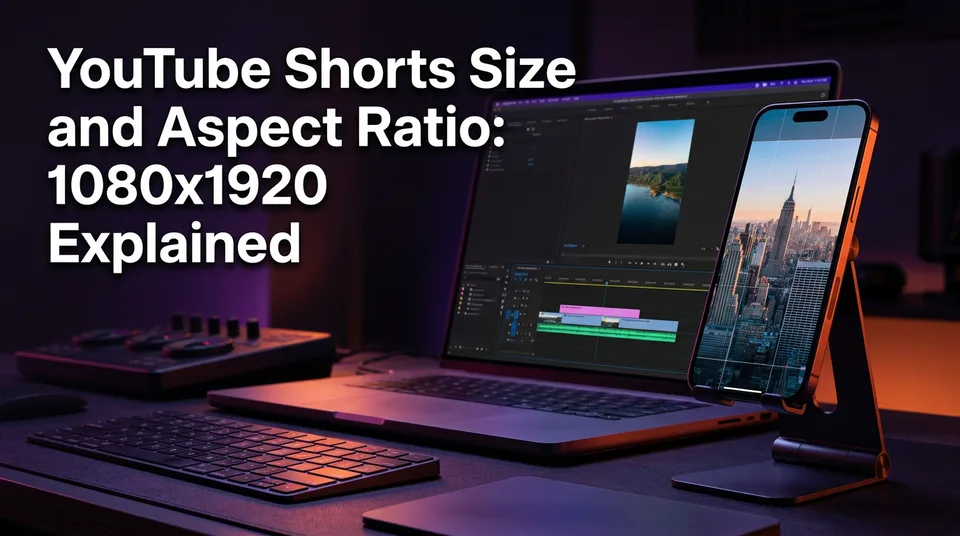
The recommended YouTube Shorts size is 1080 x 1920 pixels at a 9:16 vertical aspect ratio. It's the same canvas you'd use for Instagram Reels, Facebook Reels and TikTok, so one export can serve all four.
That's the whole spec. The rest of this page is about what happens when you stray from it, and how to finish a clip so it actually looks right on a phone.
The YouTube Shorts size: 1080x1920 at 9:16
A YouTube Short should be 1080 pixels wide and 1920 pixels tall, a 9:16 vertical frame that fills a phone screen edge to edge. Width first, height second, always. If someone asks "is vertical 16:9 or 9:16?", the answer is 9:16, because the short side comes first. 16:9 is the horizontal landscape version of the same shape.
Length doesn't change the rule. Shorts can run up to 3 minutes, and a 15-second clip and a 170-second clip use the same 1080x1920 canvas. Check YouTube Help for the current limits, since platform rules change.
Size in pixels, inches and cm
Pixels are the only unit that matters. Inches and centimeters depend on the phone: the same 1080x1920 video is about 6 cm wide on a small handset and noticeably larger on a big one. There's no fixed physical size for a Short, so don't hunt for one. Set your project to 1080x1920 and move on.
Can a YouTube Short be 16:9 or square?
Yes, a 16:9 or square file can upload, but it won't be treated like a proper vertical Short. YouTube's own guidance describes Shorts as vertical or square videos, yet vertical is the format the feed is built around. A square clip shows up smaller on screen, and a 16:9 landscape file generally plays as a regular video, not a Short.
Here's how the ratios compare in practice:
| Ratio | Pixels | What happens |
|---|---|---|
| 9:16 | 1080x1920 | Fills the screen. The target format. |
| 1:1 | 1080x1080 | Uploads, but sits small with empty space around it. |
| 16:9 | 1920x1080 | Often handled as a normal video, not a Short. |
We'd treat square and landscape as exceptions, never as a plan. If your audience watches on phones, and on Shorts they do, give them a picture that uses the whole screen.
Is 1080p or 720p better for Shorts?
1080p is the better choice, because a 1080x1920 export gives YouTube the most detail to work with. 720p (720x1280) still uploads and can look fine on a small screen, but it looks softer, especially on text and faces. Captions are where you'll notice it first.
One caution. Don't upscale a low-quality source to 1080x1920 and expect it to look sharp. Upscaling a blurry 480p clip just gives you a bigger blurry clip. Start from the best source you have.
For the file itself, MP4 with H.264 is a safe export choice. That's a practical recommendation, not a platform requirement, but it uploads reliably from nearly every editor and phone.
Safe zones: where YouTube covers your video
The safe zone is the part of the 9:16 frame that stays clear of YouTube's interface overlays. The title, channel name and caption sit near the bottom, the action buttons (like, comment, share) stack along the right edge, and the top carries the search and camera icons. Anything you put there can be covered.
Here's the rule we use when building captions:
- Keep captions and headlines away from the top and bottom edges. Roughly the middle 60% of the height is safest.
- Leave the right-hand button column empty of text and faces.
- Place headlines in the upper-middle, below the top icons, and captions around the lower-middle, above the channel name.
- Keep faces and the main action centered.
Exact overlay positions shift when YouTube updates its app, so treat these as guidelines and test on your own phone. We've watched creators lose a key word to the Like button more than once. A quick preview of your first upload saves you from repeating that mistake on 50 more.
The black bars mistake: landscape video exported as a Short
The most common mistake is dropping a 16:9 landscape video into a vertical project and exporting it with black bars above and below. On a phone, that landscape picture shrinks to a thin strip across the middle of the screen. The bars take up more than two thirds of the frame.
The math is simple. A 16:9 clip scaled to fit a 1080-pixel width is only about 608 pixels tall, inside a 1920-pixel canvas. That's roughly 32% of the screen showing actual content. Viewers swipe past a tiny picture, and your hook never gets a chance.
The fix is to reframe, not pad. Crop and reposition the clip so the subject fills the 9:16 frame, following faces or action as they move. Done by hand in an editor, that means keyframing the crop on every shot, which is tedious across a long video. WowReveal's AI Clipper does this reframing as part of finding the best moments, then adds captions and renders a 9:16 file. Whatever tool you use, the goal is the same: the subject fills the screen.
One canvas for Shorts, Reels and TikTok
Shorts, Facebook Reels, Instagram Reels and TikTok all use 1080x1920 at 9:16, so you can export once and post everywhere. That's the efficient way to run several pages. The video file stays identical. What differs is the interface sitting on top of it.
Each app places its buttons, captions and profile name a little differently, so a headline that's safe on Shorts might touch a TikTok overlay. Keep text well inside the middle of the frame and it'll survive all four.
Covers and thumbnails differ too. Reels and TikTok let you pick a cover frame, and Shorts lets you choose a frame from the video, so design the opening shot to work as a still. Check each platform's current help pages before assuming a specific cover size.
Frequently asked questions
What size is good for YouTube Shorts?
Export at 1080x1920 pixels, 9:16 vertical, as MP4 with H.264. That's the format built for the Shorts feed and it also works for Reels and TikTok.
Are YouTube Shorts 720p or 1080p?
Both upload, but 1080p is the better choice because it keeps text and faces sharper. 720p can look softer, and upscaling a low-quality source won't add detail.
Can a YouTube Short be 16:9?
A 16:9 file can upload, but it's usually handled as a regular video, not a Short. For the Shorts feed, reframe it to fill a 9:16 canvas.
Where to go next
- How to Reframe a Landscape Video to 9:16 Without Cropping Faces — The direct fix for the black bars mistake.
- From Clip to Finished 9:16 Short: A Step-by-Step Process — The next step after learning the size: finishing the clip.
- Does YouTube Automatically Convert Videos to Shorts? — Answers the related question about 16:9 uploads.
- How to Turn a YouTube Video into Shorts (Step by Step) — For readers starting from a 16:9 source video.
- Facebook Reels vs YouTube Shorts vs TikTok: Where to Post to Earn — Cross-posting context for the shared 9:16 canvas.
Generate your reel right now
Paste a link to any video — WowReveal writes the story, voices it and adds captions, a headline and music. Ready for Reels, Shorts and TikTok.



No link? Upload a file
- 30 free credits
- No card needed
- Voiceover in 9 languages
- Failed jobs refunded