Choosing the Right Source Video for AI Clipping
Not every long video deserves an AI clipper. Use this pre-flight scorecard, a 2-minute test and a rights check to pick a source that yields Reels and Shorts worth posting.
In this article
The best source video for AI clipping has clear, continuous speech or distinct action, stable audio without heavy background music, several self-contained strong moments, and rights you can prove. Podcasts, interviews, talks, and event or sports footage usually clip well. Music-heavy videos, static slideshows and anything you don't have permission to reuse usually don't.
That's the short version. The longer version matters because every bad source costs you credits, review time and sometimes a page's reach. A clipper can only find moments that exist in the file you hand it.
Key takeaways
- Pick sources with one clear voice at a time, or visible action that changes every few seconds.
- Music under speech is fine. Music over speech kills transcripts and moment detection.
- Length matters less than moment density. A tight 15-minute interview can beat a rambling 90-minute stream.
- Do the rights check before you choose a source, not after you've made the clips.
- Run a 2-minute test on an excerpt before you process the whole file.
- AI proposes candidate moments. You approve them. No source guarantees views or earnings.
What an AI clipper actually needs from a source video
An AI clipper needs three things from a source: audio it can transcribe, moments it can separate from their surroundings, and pictures that survive a crop to 9:16 vertical format. If the file fails on any of these, the output suffers no matter how good the tool is.
Speech, audio and visual signals clippers read
Most clippers work from transcript and speech detection first. They convert the audio to text, then look for complete thoughts: a question and its answer, a claim and its punchline, a story beat that ends cleanly. Audio energy (laughter, raised voices, sudden silence) and scene changes add extra signals.
That's why a source with readable speech is so valuable. The transcript is the map the tool navigates by. If the map is garbled, the clips start and end in the wrong places.
Input is simple. You paste a link or upload a file. A landscape 16:9 source is completely normal, and 720p works, though 1080p or higher is better for reasons covered below.
Why source quality limits clip quality
A clipper selects. It doesn't invent. If your source has two good moments in 40 minutes, you get two good candidates and a lot of filler.
We've seen this repeatedly: creators blame the tool when the real issue was a mumbled, music-soaked upload. Choosing the source well is the highest-leverage step in the whole workflow, because everything downstream (animated captions, headline, music, cover) only decorates what the source already gives you.
Traits of a good source video
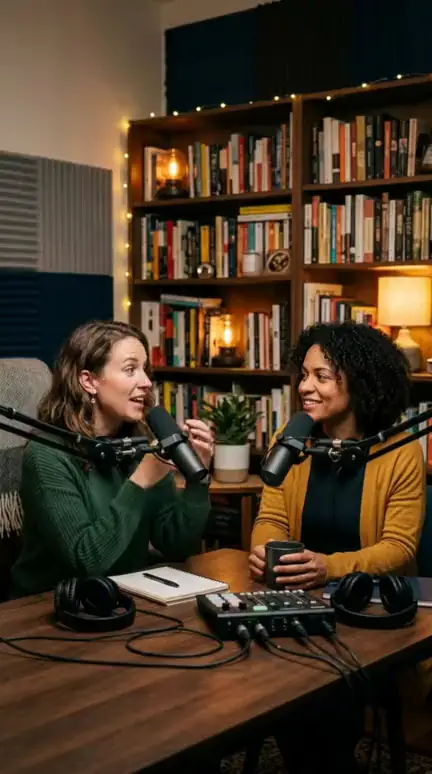
A good source video has a speaker or action you can follow, moments that stand alone, clean sound, and faces that stay readable when cropped. Four traits, and you want all of them.
Clear speech or distinct action
Either someone talks clearly and continuously, or something visibly happens: a goal, a trick, a reveal, a reaction. Both work. Mumbling over ambient noise doesn't, and neither does a camera pointed at nothing in particular.
Self-contained strong moments
A strong moment makes sense with zero context. Someone who has never seen the full video should understand it in the first 3 seconds and feel a payoff within 20 to 60 seconds. Hot takes, funny exchanges, surprising facts, emotional beats and clean demonstrations all qualify.
Test it this way: could you caption this moment without explaining what came before? If not, it's a bad clip candidate, however good the full video is.
Stable, clean audio
Consistent volume, no echo, no one stepping on anyone else. We'll go deeper in the audio section, because this trait decides more outcomes than any other.
Visible faces and framing that survive 9:16
Here's the arithmetic. A 9:16 crop from a 16:9 frame keeps only about 32% of the width. Two people sitting far apart on a wide shot will not both fit. A single talking head centered in frame will.
Sources where the speaker fills a decent part of the frame crop well. Wide shots of tiny figures don't.
Traits of a bad source video
A bad source has dense music, overlapping voices or echo, long static stretches, or a picture too small or too cluttered to crop well. Most of these show up in the first 60 seconds if you look for them.
Dense music, crosstalk and echo
Loud music under speech confuses transcription. Crosstalk makes speaker attribution unreliable. Echo from a bare room turns words into mush. The resulting clips start mid-sentence, caption incorrectly or both.
Static scenes and slideshows
A 3-minute slideshow with a voiceover has one moment, repeated. Silent screen recordings are worse: no speech to transcribe and no action to detect. There's nothing for a clipper to rank against anything else.
Low resolution, tiny subjects and burned-in subtitles or logos
A 1080p landscape frame cropped to 9:16 leaves roughly 608×1080 pixels. Scaling that up to 1080×1920 softens the picture noticeably, so a 480p source looks rough and a 4K source looks sharp.
Burned-in subtitles and corner logos are a separate problem. The crop may cut them in half, or captions may stack on top of existing text. Both look amateur, and a watermark from another creator invites originality trouble.
Audio quality: the factor that decides most clips
Audio quality decides more clips than picture quality, because clipping runs on the transcript and a poor transcript produces poorly cut clips. Clean speech improves both the text and the timing of each moment.
Three things to listen for: background music level, echo, and overlapping voices. Music that sits clearly below the voice is fine. Music at the same level as the voice is a fail.
Opinion, earned the hard way: we'd take a plain, slightly boring interview with clean sound over a beautifully shot video with a muddy mix. Viewers on Facebook Reels and TikTok forgive average visuals. They don't forgive hard-to-hear speech, and retention rate (the share of the video people actually watch) drops fast when they can't follow.
Quick listening test before you upload
Do this in 2 minutes, on a phone speaker, since that's how most of your viewers will hear it:
- Play 30 seconds from the start, 30 from the middle and 30 from near the end.
- Check you understand every sentence at normal speed, without rewinding.
- Listen for volume swings, room echo and music that competes with the voice.
- Note how often two people talk at once.
If you rewound more than once, the source fails. Fix it or pick another.
How long should the source video be?
For talk content, a source of roughly 10 to 60 minutes is a practical range, but clip yield depends on moment density, not on duration. This isn't a fixed rule. It's where we've seen the best balance between enough material and manageable review time.
Too short, too long and the sweet spot
Under about 5 minutes, there's rarely more than one self-contained moment, and you're basically trimming, not clipping. Over 90 minutes, you can get great material, but reviewing candidates becomes a chore and the density often thins out.
A dense 15-minute interview can out-yield a sprawling 2-hour livestream. Judge by how often something quotable happens, not by minutes.
Typical clip yield by length
These are rough planning guides, not promises:
| Source length | What you'll typically get | Watch out for |
|---|---|---|
| Under 5 min | One or two candidates, mostly trimming | Little to choose from |
| 10-30 min | A handful of candidates if the talk is dense | Intro and outro filler |
| 30-60 min | More candidates, more sorting | Review time, repeated points |
| 90 min+ | Wide choice, uneven quality | Long dead stretches, fatigue |
Which source types clip best: a comparison
Podcasts, interviews, talks, streams, sports and event footage fit AI clipping best. Music videos, slideshows and silent screen recordings fit worst. The forum advice you'll see repeated, Reddit threads included, is simply "use a podcast". That's right but incomplete.
Source-type matrix with expected yield and failure modes
| Source type | Expected yield | Typical failure mode |
|---|---|---|
| Podcast / interview (2 clear speakers) | High | Crosstalk, wide two-shot crops badly |
| Talk or conference session | Medium-high | Slides dominate, audience noise |
| Livestream | Medium | Long dead air, chat-reading filler |
| Sports or event footage | Medium-high | Commentary over crowd noise, tiny players |
| Tutorial with face or voice | Medium | Moments depend on earlier steps |
| Vlog | Low-medium | Music bed, jump cuts, thin speech |
| Music video | Low | Lyrics aren't a story, rights are strict |
| Slideshow / silent screen recording | Very low | Nothing to detect or rank |
For podcast clips, remember the crop problem. If the video is a wide two-shot, pick a source with separate close-ups or accept that you'll crop to one speaker at a time.
On TikTok, YouTube Shorts, Instagram Reels and Facebook Reels, the same ranking holds. What changes is how much each platform tolerates reused material, which brings us to rights.
Check your rights before you clip
Confirm that you own the video, hold a license, or have written permission before you clip it, and do it before you pick the source. It's the cheapest check in the whole process and the one most guides skip.
Three questions:
- Did I make this, or does someone with the authority to say yes own it?
- Do I have a license or written permission that covers short-form clips on a monetized page?
- Am I adding something of my own, such as commentary, voiceover, structure or an edit with a point of view?
If any answer is no, stop. This isn't legal advice, and the rules differ by platform and can change. YouTube's help page on reusing content explains what creators can and can't take from other channels, and the Meta Business Help Center is the official source for Facebook content and originality policies.
Own it, licensed, or permission in writing
Your own podcast, your own stream, footage a client hired you to cut, content under a clear license: those are safe starting points. "It was public" is not permission. "I gave credit" is not permission. Get it in writing, even if it's a two-line email.
Why reused source needs your own commentary or edit
Even with permission, platforms favor original contribution. We've watched pages lose reach for weeks after reposting one unoriginal clip. Meta and YouTube both put weight on originality, and an unmodified re-upload of someone else's footage is the classic way to lose Facebook content monetization or YouTube Partner Program eligibility.
So if your source is licensed or permissioned material, add real value: your own voiceover, analysis, a new structure or a distinct angle. And never try to dodge Content ID or originality checks with tricks. They don't work reliably and they put the whole page at risk.
A 10-point source scorecard and 2-minute test
A source passes when it clears at least 8 of the 10 checks below, including rights, speech clarity and audio. These thresholds are our working heuristics, not platform rules, so adjust them to your niche.
The scorecard
| # | Check | Pass | Fail |
|---|---|---|---|
| 1 | Rights | Own it, licensed, or written permission | Unknown or "public so it's fine" |
| 2 | Speech or action | Followable at normal speed | Mumbled, or nothing happening |
| 3 | Music level | Clearly below the voice | Equal to or louder than the voice |
| 4 | Audio stability | No echo, no big volume swings | Echo, clipping, constant hiss |
| 5 | Moment density | 2+ stand-alone moments in a random 10 minutes | Moments need long context |
| 6 | Visual variety | Something changes every 5-10 seconds | Same frame for minutes |
| 7 | 9:16 crop | Key face or subject fits in the center third | Subjects far apart or tiny |
| 8 | Resolution | 1080p or higher (720p minimum) | Below 720p |
| 9 | Clean frame | No burned-in subtitles or foreign logos in the crop | Text or watermarks in the crop zone |
| 10 | Length vs density | Worthwhile material across the whole file | Padded, repetitive, or too thin |
Fail on rights, and nothing else matters. Fail on 2 or 3 and you'll fight the tool the whole way.
Run a test clip before processing the whole file
Cut a 2 to 3 minute excerpt from the middle of the source, not the intro, and run it through the WowReveal AI Clipper or whichever clipper you use. WowReveal gives you free credits to start without a card, so a test costs very little.
Then check four things:
- Is the transcript accurate enough that captions don't need heavy fixing?
- Did it pick moments that make sense with no context?
- Does the hook land in the first 3 seconds?
- Do the animated captions and the 9:16 framing keep the speaker readable?
Two or more fails on the excerpt means the full file will do the same at larger scale. Rework the source or drop it.
AI proposes, you approve. Always watch each candidate, trim the start and end, and rewrite the headline if it's weak. No source, and no tool, guarantees views or earnings.
What to do when your source scores low
Most low-scoring sources can be rescued with a trim, a cleaner audio pass or a different segment, but some should simply be dropped. Spend 10 minutes on the fix, not an hour.
- Messy audio: run noise reduction in your editor before upload. If it's still muddy, find a cleaner part of the file or another source.
- Thin density: trim to the best 10 to 20 minutes and clip only that.
- Tiny subjects: pick a closer camera angle if one exists, or skip that section.
- Little original value: add your own AI voiceover or commentary so the clip carries your angle, not just someone else's footage. WowReveal can write a story and voice it in 9 languages, which helps when the source language isn't your audience's.
- Free options: use your own recordings, material you have written permission for, or content under a clear license. Free credits let you test before you pay.
Some sources aren't worth saving. A silent screen recording or a music-drowned vlog will cost more time to rescue than a new source would cost to find. Move on.
Frequently asked questions
What kind of video works best for an AI clipper?
A video with clear, continuous speech or distinct action, stable audio, several self-contained moments and confirmed rights. Podcasts, interviews, talks, streams and sports or event footage usually fit. Music videos, slideshows and silent screen recordings usually don't.
How do I generate a video clip with AI from a long video?
Choose a source that passes the scorecard, then paste its link or upload the file to a clipper. The tool transcribes the speech, proposes candidate moments and renders them in 9:16. You still review each one, trim it, and check the hook before posting.
Is it legal to clip someone else's video?
Not without permission, in most cases. Clip only what you own, have licensed or have written permission to reuse, and add your own commentary or edit. This is general information, not legal advice, and platform rules can change, so check the official help pages.
What's the best free source for AI clipping?
Your own recordings are the safest free source: podcasts, streams, interviews or talks you made. Material with written permission or a clear license also works. Starting with free credits lets you test a 2-minute excerpt before processing the full file.
Where to go next
- AI Clipping Tools Explained: How They Work, Where They Fail and How to Choose One — Learn how clippers detect moments so you can predict which sources they'll handle well.
- Is YouTube Clipping Legal? Permission, Fair Use and Safe Practice — Go deeper on the rights check before you pick a source.
- How to Turn a YouTube Video into Shorts (Step by Step) — The step-by-step route if your source is a YouTube link.
- How to Reframe a Landscape Video to 9:16 Without Cropping Faces — Fixes the framing problem when your landscape source has small subjects.
- Reused Content Checker: How to Self-Audit a Video Before Posting — Check originality on clips made from a reused source.
- Best AI Video Clipper: Features to Compare Before You Choose — Next step once you've picked a source and need a tool.
- Repurposing Long Video into Shorts: The Complete Workflow — The full workflow after your source is chosen.
- From Source Video to Posted Short: The AI Production Pipeline — See where source selection sits in the whole production pipeline.
- Designing Shorts for Sound-Off and Mobile Viewing: A Practical Guide for Reels and Shorts
- TikTok Unoriginal Content: Why Your Video Is Not Eligible for the For You Feed
- Maximum Video Length: Reels vs Shorts vs TikTok Cheat Sheet
- How to Ask Permission to Use Someone's Video (Message Template)
Generate your reel right now
Paste a link to a long video — AI finds the best moments and turns them into ready Shorts with captions.

No link? Upload a file
- 30 free credits
- No card needed
- Voiceover in 9 languages
- Failed jobs refunded